
Introduction
Intune's Windows Driver Update profiles let you control which drivers reach your fleet. But the moment you need to answer a simple question, "which of my devices will actually receive this driver?", the portal gives you nothing but a count. No device names, no user details, no way to drill down. You are flying blind on approvals that affect hundreds of machines.
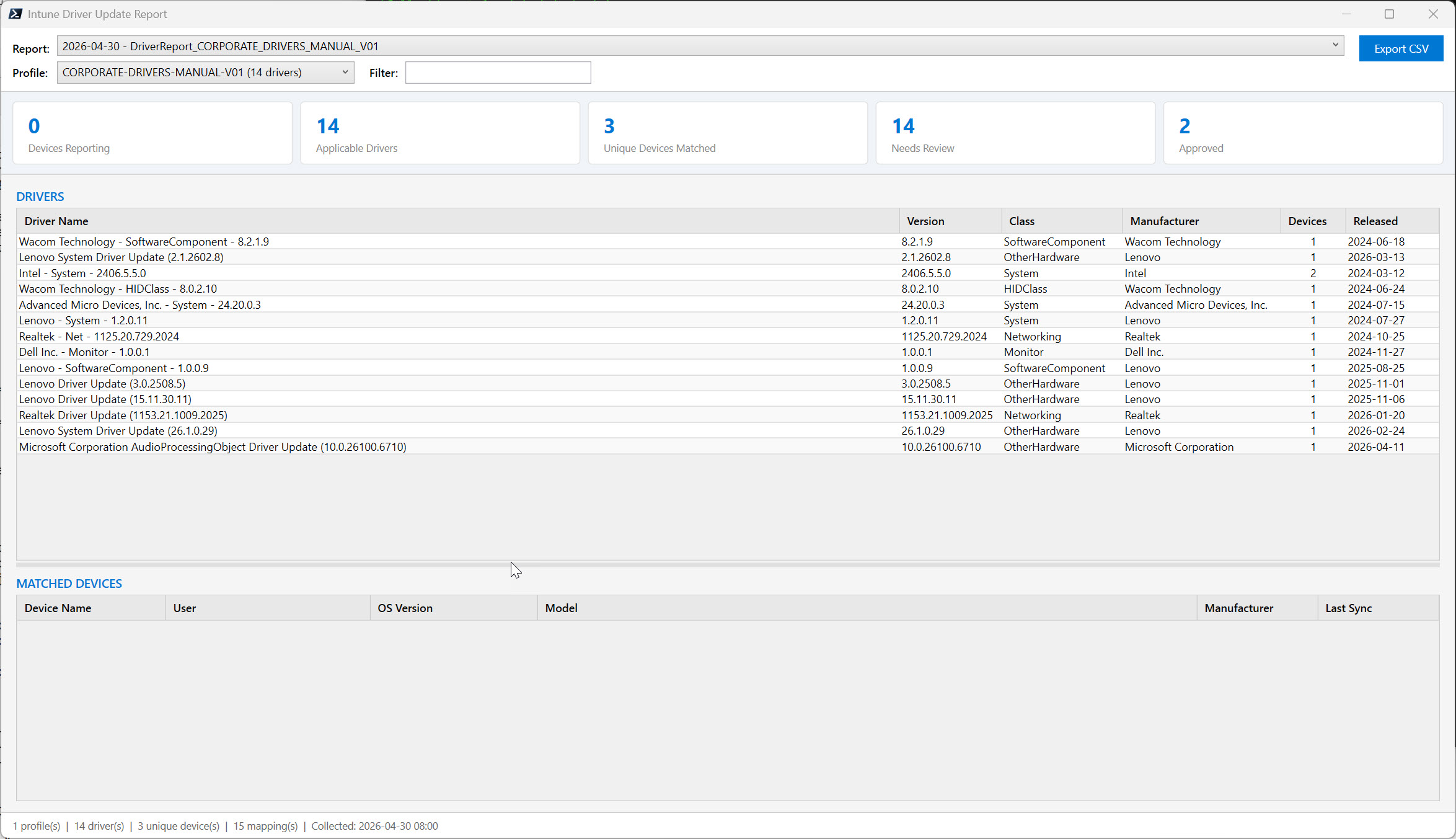
The solution gives you what the portal doesn't: every driver mapped to every device, with filtering and export
This solution automates the entire data collection chain that Microsoft left incomplete. It pulls driver inventory, audience membership, applicable content, and matched devices through a 6-step Graph API sequence, then presents everything in a native desktop viewer where you can filter, sort, and export. One command to collect, one command to view.
Get Instant Access to This Solution
Join the membership platform and get the complete toolkit with WPF viewer and full documentation
MVP-Built Solutions • Production-Ready • Complete Documentation
Why This Exists
The per-device data is not exposed anywhere in the Intune portal or the Graph reporting pipeline:
- There is no
DriverUpdateDeviceStatusByPolicyreport. The only available report returns one row per policy with aggregate counts. - The portal itself uses WUfB-DS endpoints under
/beta/admin/windows/updates/that return Entra device IDs only, never names. - Resolving each device ID to a name requires a separate call to
/deviceManagement/managedDevices. At scale, that is hundreds of paginated API calls. - No built-in way to compare today's state to last week. Drivers get added, approvals change, and you have no visibility into what moved.
What's in the Solution
1. Automated Data Collection
One command walks the full API chain: discovers profiles, preloads your device inventory, resolves WUfB-DS audiences, and queries matched devices for every driver. Output is a hierarchical JSON report saved to a date-organized folder.
2. WPF Desktop Viewer
A native Windows application for browsing collected reports. Select a profile, filter drivers by name, click any row to see the matched devices with device name, user, OS, manufacturer, and model. Export any grid to CSV.
3. Historical Comparison
Each run saves a timestamped report. The viewer lets you switch between collection dates to see what changed: new drivers, approval status changes, device count shifts.
4. Graph API Resilience
Automatic retry with exponential backoff on 429 throttling, full pagination, and graceful handling of incomplete data. Runs reliably against tenants with thousands of devices.
Key Benefits
- Informed approval decisions: know which users and device models will receive a driver before you approve it
- Pending review visibility: summary cards show drivers waiting for approval across all profiles
- CSV export for stakeholders: reports ready for change management or CAB meetings
- Multi-profile support: collect all profiles in one run or target a specific one
- Date-organized history: compare driver landscape over time without extra tooling
- Zero infrastructure: runs from any Windows workstation with PowerShell 7 and Graph SDK
Requirements
The solution runs on standard Windows admin workstations:
- PowerShell 7.x with the Microsoft Graph PowerShell SDK (
Microsoft.Graph.Authenticationmodule) - Microsoft Graph API permissions:
DeviceManagementConfiguration.Read.All,WindowsUpdates.Read.All,DeviceManagementManagedDevices.Read.All - At least one Windows Driver Update profile configured in Intune with a WUfB-DS deployment audience
- Windows OS for the WPF viewer (data collection itself runs on any platform)
No additional infrastructure. No agents. No cloud services to configure. Read-only Graph permissions only.
What's Included
When you access this solution through membership, you receive:
- The complete solution package: ready-to-run script with modular source files for data collection and WPF viewer
- Implementation guide: setup, configuration, usage examples, parameter reference, and troubleshooting
- WPF desktop viewer: native Windows application for browsing reports with filtering, sorting, and CSV export
- Date-organized report structure: automatic historical tracking with no additional setup
- Direct access to the author: Microsoft MVP support through membership
Ready to See What's Behind the Count?
The complete solution with WPF viewer, production-tested by a Microsoft MVP
MVP-Built Solutions • Production-Ready • Complete Documentation
About the Author

🎯 Specializations
- Microsoft Defender XDR
- Microsoft Sentinel SIEM & SOAR
- Microsoft Entra ID (Azure AD)
- Microsoft Intune
- Azure Arc Services
- Azure Log Analytics
- Azure Automation
- Hybrid Cloud Management