
Introduction
The Secure Boot 2026 certificate transition touches every physical Windows device in your organization. Every workstation, laptop, and server needs a firmware update and a certificate deployment before the old Microsoft certificate expires in 2026. A separate second-phase rollout is required on top of that to close the BlackLotus vulnerability. Leave devices behind and you carry real risk: unpatched exposure to the very vulnerability these mitigations address, and an out-of-support state as Microsoft and OEMs move forward with the new chain.
Microsoft ships the platform but leaves the hard part to you: figuring out which of your hundreds or thousands of devices actually need firmware updates, which are covered by automatic rollout, and which will be left behind. This done-for-you toolkit takes that problem off your plate. Point it at your existing management environment, get a clear picture of your fleet's readiness, and roll out both phases on your own timeline with confidence.
Get Instant Access to This Solution
Join the membership platform and get the complete toolkit plus the April 2026 workshop slides
MVP-Built Solutions • Production-Ready • Complete Documentation
The Problem
Every organization running a mixed Windows fleet hits the same wall when it starts planning the Secure Boot 2026 transition:
- Firmware comes before certificates: deploying the new certificates on devices with outdated BIOS silently fails. Without knowing which devices need firmware updates first, the rollout stalls before it starts.
- Three vendors, three formats, thousands of models: Dell, HP, and Lenovo each publish their own readiness documentation with different models, version formats, and naming conventions. Cross-referencing your fleet against all three by hand does not scale.
- No built-in visibility from Microsoft: the tools Microsoft provides are narrow, require specific telemetry and tenant settings, and cover only part of the transition.
- The second phase is a breaking change: the post-certificate revocation step affects legacy boot and recovery media. You need to know exactly what will break before you trigger it, and you need to track completion on every device.
- Servers don't auto-update: every physical server and every Azure Gen2 VM must be explicitly triggered and tracked. Nothing happens on its own.
- Microsoft's auto-deploy list is opaque: Microsoft will auto-deploy the update to specific models, but the data is buried and there is no portal to query. You can't plan around it without the data in hand.
Solution Overview
An end-to-end, production-tested solution for the Secure Boot 2026 transition. Everything you need to go from "we haven't started" to "we're fully rolled out" across SCCM-managed, Intune-managed, server, and cloud environments. Delivered as a single package with no agents to install and no infrastructure to stand up.
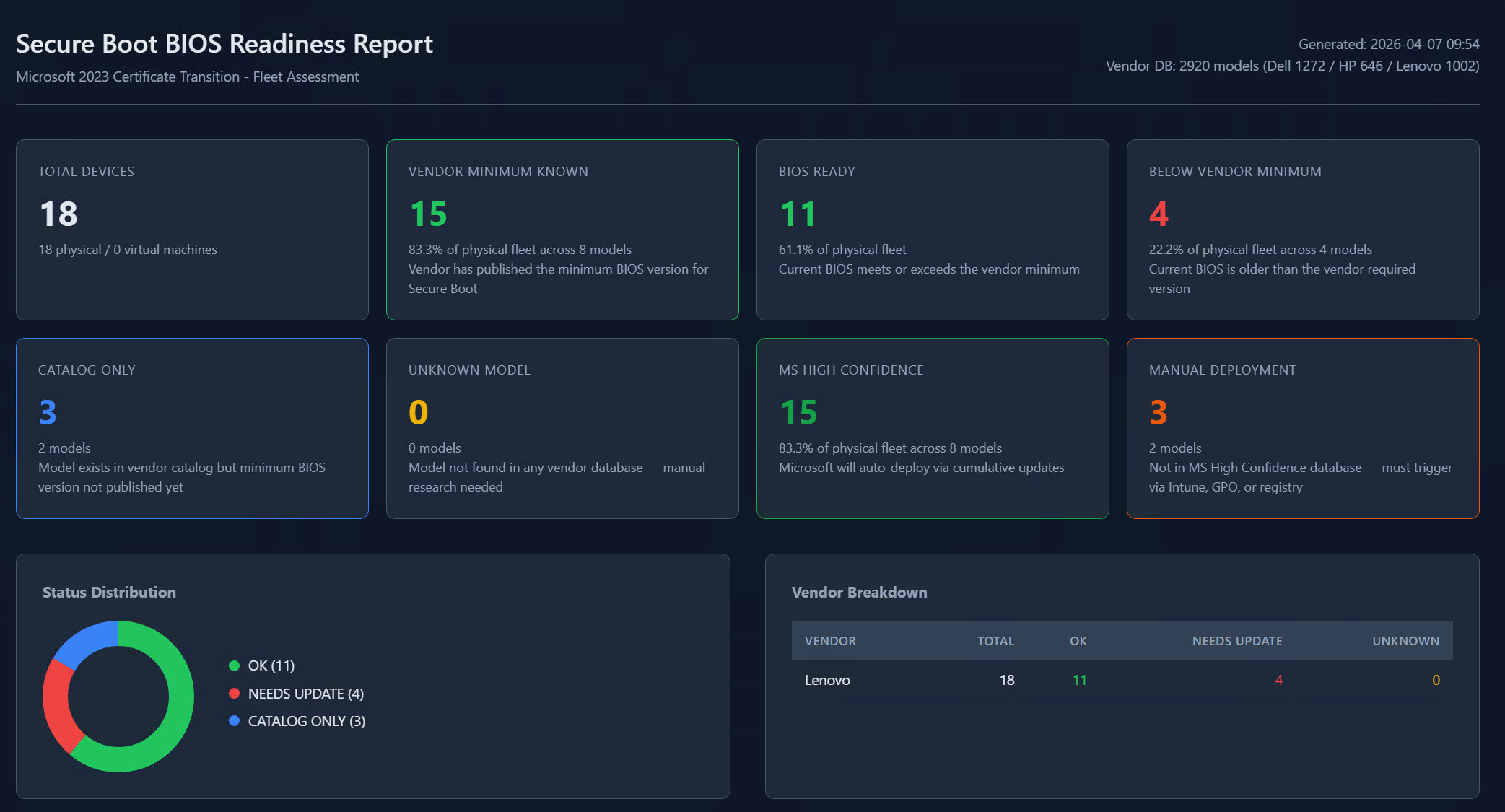
Interactive readiness report: executive summary, vendor breakdown, and per-device detail at a glance
What's in the Toolkit
Five capability areas, delivered as a single download. Pick the ones that match your environment.
1. Fleet Assessment
Run one command against your existing management environment and receive a complete readiness report for every device. Works against Configuration Manager for on-prem fleets and Microsoft Graph for Intune-managed fleets, and covers both workstation and server scenarios. Output is an interactive HTML dashboard with a searchable, sortable device table, vendor breakdown, and executive summary cards.
2. Per-Device Diagnostic and Remediation
Tooling that runs on individual devices to diagnose exactly where each one sits in the transition and safely trigger both rollout phases. Includes prerequisite validation, safe sequencing, and a read-only detection mode that plugs into SCCM Configuration Items and Intune Remediations for compliance tracking through your existing reporting.
3. Vendor Readiness Databases
Curated readiness data for Dell, HP, and Lenovo covering thousands of device models, sourced from each vendor's official Secure Boot documentation and maintained through 2026 as vendors publish new firmware. Every entry is classified so you know at a glance whether a model is ready, pending a vendor update, or will never receive one. Cross-referenced with Microsoft's own automatic-deployment list so you can tell which devices Microsoft will cover and which you need to handle yourself.
4. Vendor Database Editor
A Windows GUI for extending the vendor databases when you encounter a model that is not already covered. Validation, safeguards against bad entries, and automatic backups so you can extend the data without risking the core databases. You stay in control of what goes into your environment.
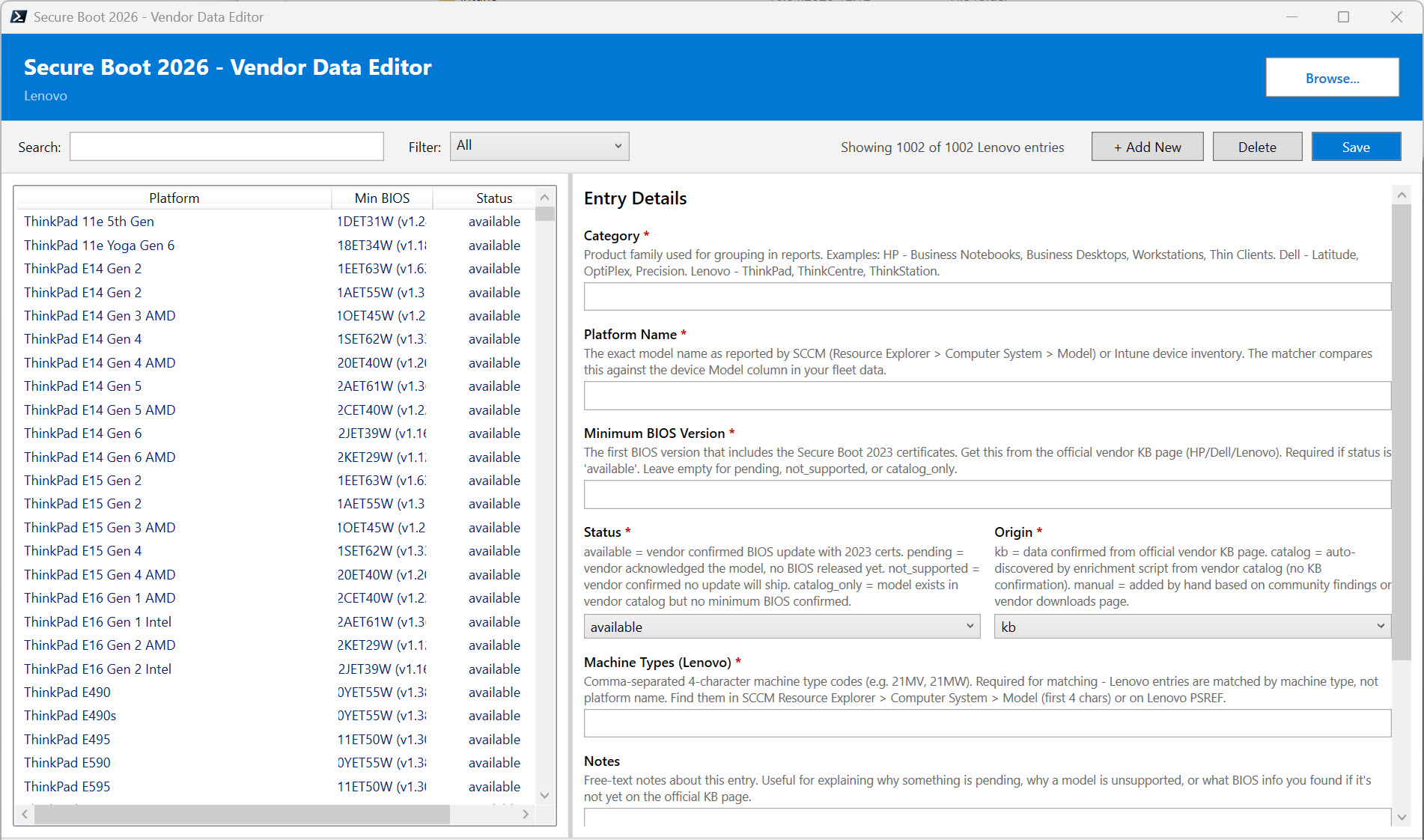
Vendor Data Editor with validation, search, and safe extension of the built-in databases
5. Progress Tracking
Every assessment run is saved as a point-in-time snapshot. Aggregate multiple snapshots into a trend report showing how your fleet's readiness improves week over week. Ideal for showing progress to management, tracking SLAs, and demonstrating the rollout is on course for the deadline.
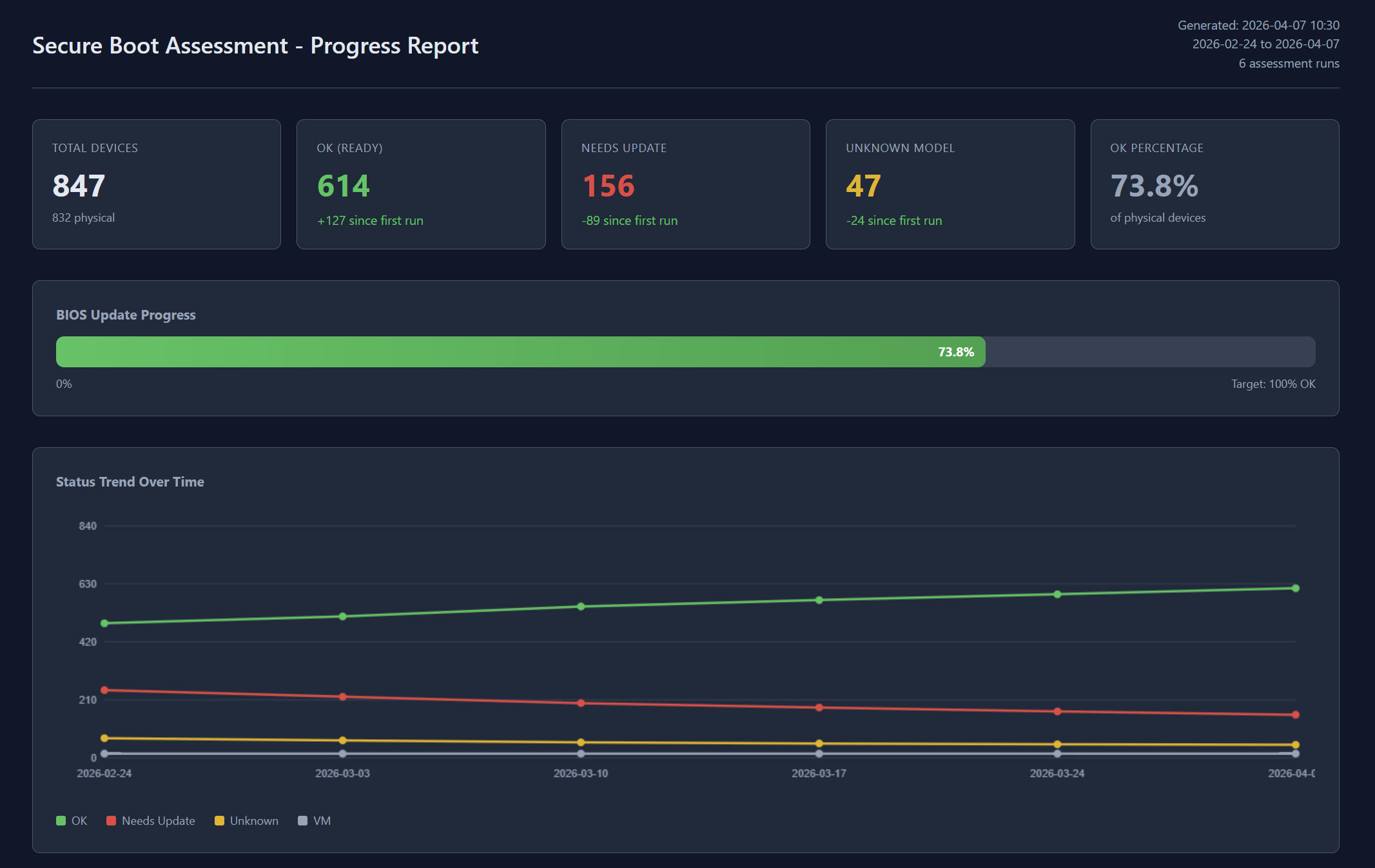
Trend report showing fleet readiness improving over successive assessment runs
Bonus: Secure Boot Speed Date Workshop Slides
Members also receive the full PDF slide deck from the Secure Boot Speed Date Workshop delivered in April 2026. The workshop is structured around two core parts: a deep-dive on assessment (how to size up your fleet and interpret the readiness data) and a deep-dive on deployment (how to roll out both phases with confidence). Throughout, the slides walk through exactly how to apply the toolkit in your own environment.
Key Benefits
For Infrastructure Teams
- Fleet-wide readiness in minutes, not weeks: replaces manual cross-referencing with a single command
- Zero agents to install: works against your existing inventory sources
- Multi-vendor coverage maintained for you: vendor readiness data kept current as Dell, HP, and Lenovo publish updates
- Progress tracking built in: snapshot-based trend reports show remediation velocity
For Security Teams
- Both phases, one toolkit: certificate deployment and post-rollout revocation handled end-to-end
- Per-device diagnostic clarity: know exactly where every device is in the rollout, including which are blocked by firmware issues
- Compliance detection ready for SCCM and Intune: plug into your existing Configuration Items or Remediations and track through existing reporting
- Audit-ready evidence: every run produces structured data for compliance and risk reporting
For Management
- Executive dashboards: summary cards show fleet readiness, what Microsoft will auto-deploy, and what your team needs to handle
- Trend visibility for project tracking: progress over weeks and months, not just a snapshot
- Informed hardware-refresh decisions: unsupported models flagged so you can plan replacements before the deadline
- Deadline confidence: measurable progress toward the 2026 enforcement date
Requirements
The toolkit runs in standard Windows administration environments:
- A modern PowerShell environment on the machine running the assessments
- Read access to your Configuration Manager inventory (for SCCM-managed fleets) or standard Graph API permissions (for Intune-managed fleets)
- Administrator rights on individual devices for the interactive diagnostic and remediation tooling
- Standard SCCM or Intune permissions for the compliance detection integrations
No additional infrastructure. No new licensing. No cloud service to configure.
What's Included
When you access this solution through membership, you receive:
- The complete toolkit: ready-to-run package covering every capability area above
- Quick-start guides: get from download to first report in under 30 minutes
- Full implementation documentation: covering every scenario from SCCM-only to Intune-only to hybrid, with project plan templates and rollout guidance
- Workshop slide deck (PDF): the full deck from the Secure Boot Speed Date Workshop (April 2026), structured around assessment and deployment and showing how to apply the toolkit in your environment
- Ongoing vendor data updates: Dell, HP, and Lenovo readiness data refreshed as vendors publish new firmware
- Direct access to the author: Microsoft MVP support through membership
Ready to Assess Your Fleet?
The complete toolkit plus the April 2026 workshop slides, production-tested by a Microsoft MVP
MVP-Built Solutions • Production-Ready • Complete Documentation
About the Author

🎯 Specializations
- Microsoft Defender XDR
- Microsoft Sentinel SIEM & SOAR
- Microsoft Entra ID (Azure AD)
- Microsoft Intune
- Azure Arc Services
- Azure Log Analytics
- Azure Automation
- Hybrid Cloud Management